
PhoneRemindAdmin

WhatsApp reminder calls

Turn a WhatsApp message into a reminder call.

Tell PhoneRemind what matters and when. PhoneRemind confirms the reminder and calls at the scheduled time so an important task is harder to miss.

Team PhoneRemind - Last updated May 27, 2026 - Last reviewed May 27, 2026

See how it works

Everyday India use cases

  • Medicine and appointment reminders
  • Meetings and deadlines
  • Classes and school schedules
  • Bills and recurring personal tasks

Quick answer

A WhatsApp reminder call is a real phone call that PhoneRemind places at the time you set in a WhatsApp message, such as "Call me 15 minutes before my 3 pm client meeting." It adds a stronger reminder layer for important meetings, appointments, classes, deadlines, and family events where a normal notification may be too easy to miss.

Useful details before you choose PhoneRemind

Who it is for

  • Professionals who plan meetings but miss normal alerts during a busy workday.
  • Parents and families juggling appointments, school events, classes, and deadlines.
  • Users who want calls only for selected important events, not every small task.
Exact reminder examples

  • Call me 10 minutes before my 3 pm client meeting.
  • Call me 30 minutes before the school meeting on Saturday.
  • Call me 1 hour before my doctor appointment tomorrow.
  • Call me on Friday at 10 am about the tax filing deadline.

How PhoneRemind works

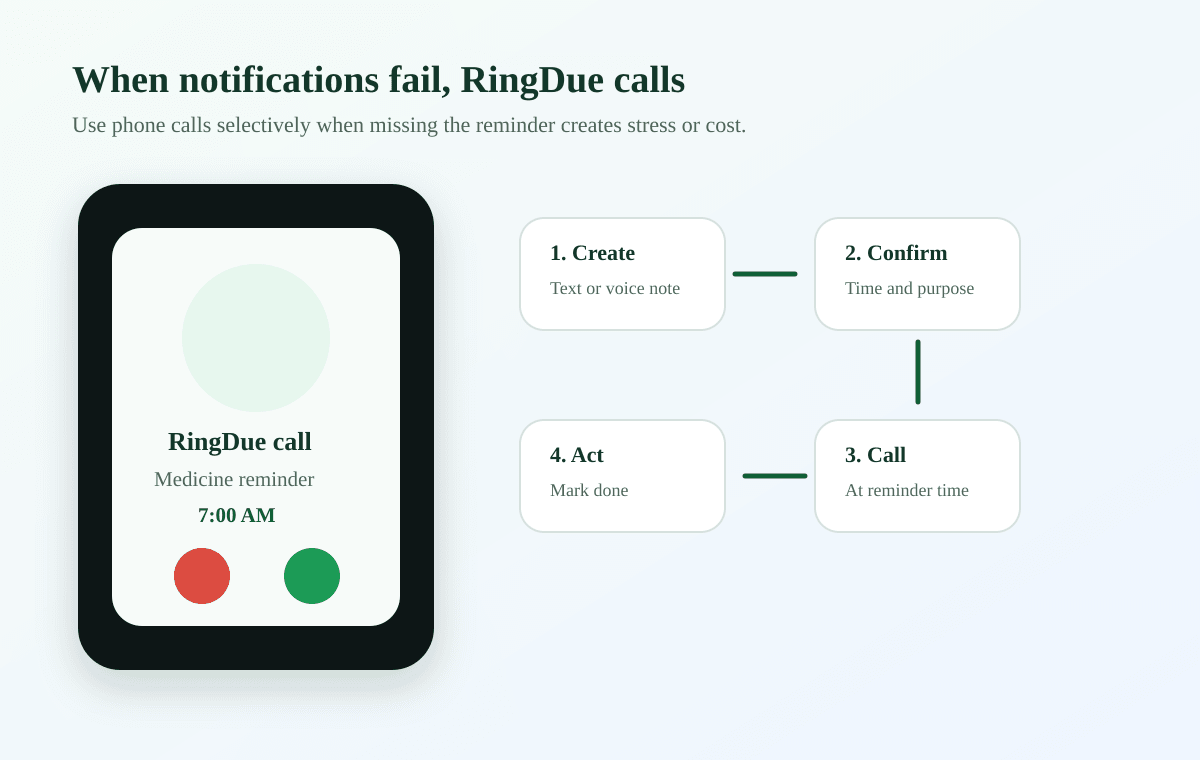
  • Send PhoneRemind the event and time on WhatsApp, as text or a voice note.
  • PhoneRemind confirms the reminder and how early it should call.
  • At that time, PhoneRemind places a real phone call to your number.
  • If you miss the call, PhoneRemind retries and can escalate to an opted-in backup contact.

Limits and compliance

  • PhoneRemind only calls for reminders you send it; it does not replace your planner.
  • Calls should be enabled selectively to avoid call fatigue.
  • Reminder calls are for personal events and opted-in users, not promotional calling.

Pricing and call limits

  • Free trial credits can test a few selected event calls.
  • Plus and Pro plans support higher monthly call reminder usage.
  • Each reminder call, retry, or backup escalation can count against call credits.

For current call-credit details, see the PhoneRemind pricing page. Plan limits can change during rollout because outbound call costs and usage patterns vary.

PhoneRemind reminder call flow before an important meeting

WhatsApp message to reminder call flow

Send the event time on WhatsApp and get a real phone call only where a normal alert may be missed.

How PhoneRemind helps

Message naturally

Send a normal WhatsApp message or voice note with the task, date, and time.

Confirm the schedule

PhoneRemind shows the subject, call time, recurrence, and spoken note before the reminder is stored.

Receive a real call

At the scheduled time, PhoneRemind places a phone call instead of relying only on another notification.

Best for

  • Parents managing classes, school tasks, and pickup reminders.
  • Families managing medicines, bills, appointments, and household work.
  • Professionals managing meetings, follow-ups, and deadlines.
  • Caregivers managing care routines and appointment reminders.
  • Students managing coaching classes, exams, and submissions.

Not for

  • Bulk calling or unsolicited calling.
  • Marketing calls or telemarketing.
  • Lead generation or sales dialers.
  • Calling people who have not opted in.
  • Promotional campaigns or third-party outreach.

Built for personal reminders only

PhoneRemind calls only for reminders you create or explicitly opt into. It is for personal reminder workflows, not promotional calling, sales outreach, or unsolicited campaigns. You can disable call reminders, pause messages, and delete your account data.

Responsible reminder calls

PhoneRemind places calls only for reminders users create or explicitly opt into.

PhoneRemind is not for bulk calling, lead generation, sales outreach, or marketing campaigns.

Users can disable call reminders, cancel reminders, and request account deletion.

Use phone calls for important reminders so calls stay useful and intentional.

Trust and control

Reminder calls should stay personal and intentional.

User-created reminders only

PhoneRemind calls for reminders users create or explicitly approve.

Opt-in reminder calls

Phone calls are tied to verified, opt-in personal reminder workflows.

Disable calls anytime

Users can cancel reminders, pause calls, and request account deletion.

Use calls carefully

Call reminders work best for important tasks, not every small notification.

Not for marketing calls

PhoneRemind is not for bulk calling, lead generation, spam, or promotions.

Frequently asked questions

How do WhatsApp reminder calls work?

Send PhoneRemind a WhatsApp text or voice note with the task and time. After the details are confirmed, PhoneRemind schedules a phone call reminder.

Does PhoneRemind send reminders through WhatsApp?

WhatsApp is the setup and management channel. The important reminder itself can arrive as a phone call.

Can the reminders repeat?

Yes. PhoneRemind supports one-time, daily, and weekly call reminders created from WhatsApp.

Start with one WhatsApp reminder.

Send a WhatsApp text or voice note. PhoneRemind understands the reminder and calls you before important tasks, classes, medicines, meetings, and family responsibilities.